
Discount codes
Run targeted promotions with discount codes that merchants unlock at checkout. Perfect for partner programs, podcast sponsorships, win-back campaigns, or any time you want to hand out a discount to a specific group without enabling it for everyone.
The code is the scoping — only merchants who know it can redeem it, and it travels with them across every plan change, upgrade, and downgrade. Works with Mantle's hosted billing (flip one setting) or your own checkout UI (one API call).
Set a code on the discount
Open any discount in your Mantle dashboard and set a value in the new Discount code field.
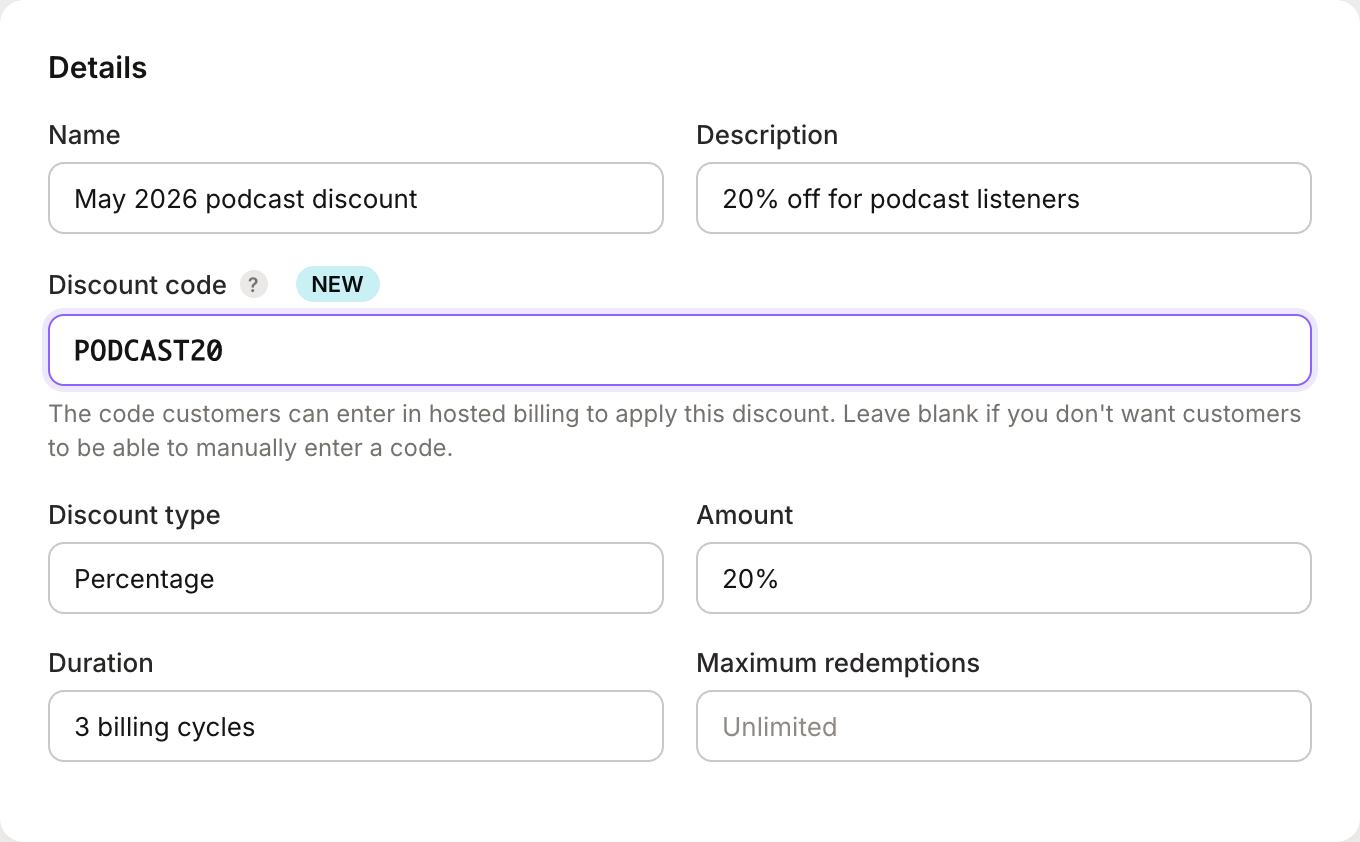
A few things to know:
Codes are unique per app and case-insensitive, so
podcast20andPODCAST20resolve to the same discount. Different apps in the same organization can reuse codes.Leave the field blank if you don't want merchants to be able to enter the code manually — for example, if this discount is only applied programmatically.
The rest of the discount configuration still applies on top of the code: percentage or fixed amount, duration, date window, redemption cap, customer or tag restrictions, plan restriction.
Option A: Hosted billing
If your merchants subscribe through Mantle's hosted billing pages, open your Plan list page and enable Show discount code input in the page settings.
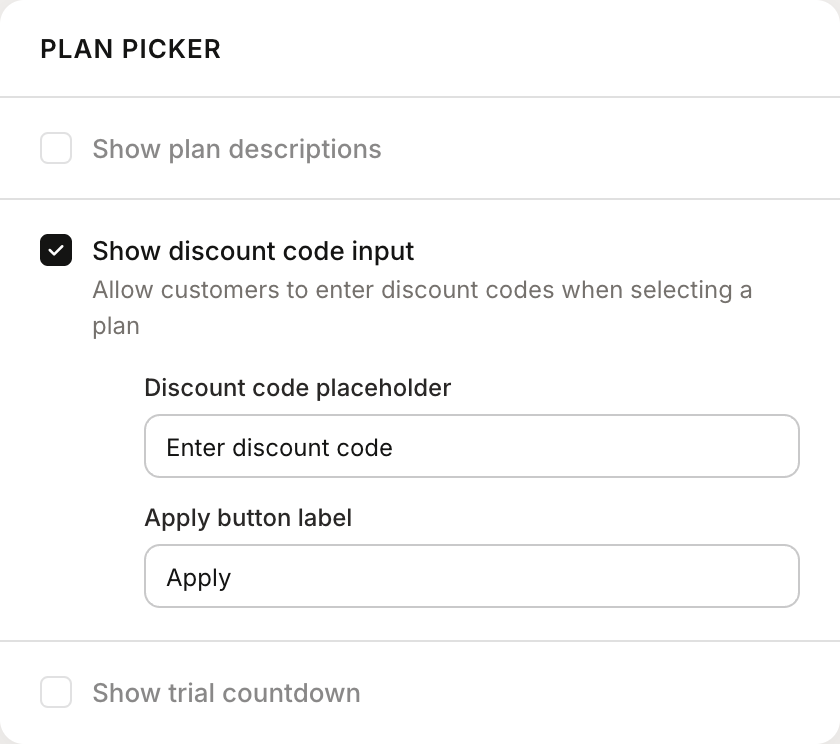
Two optional fields let you customize the input:
Discount code placeholder — defaults to
Enter discount code.Apply button label — defaults to
Apply.
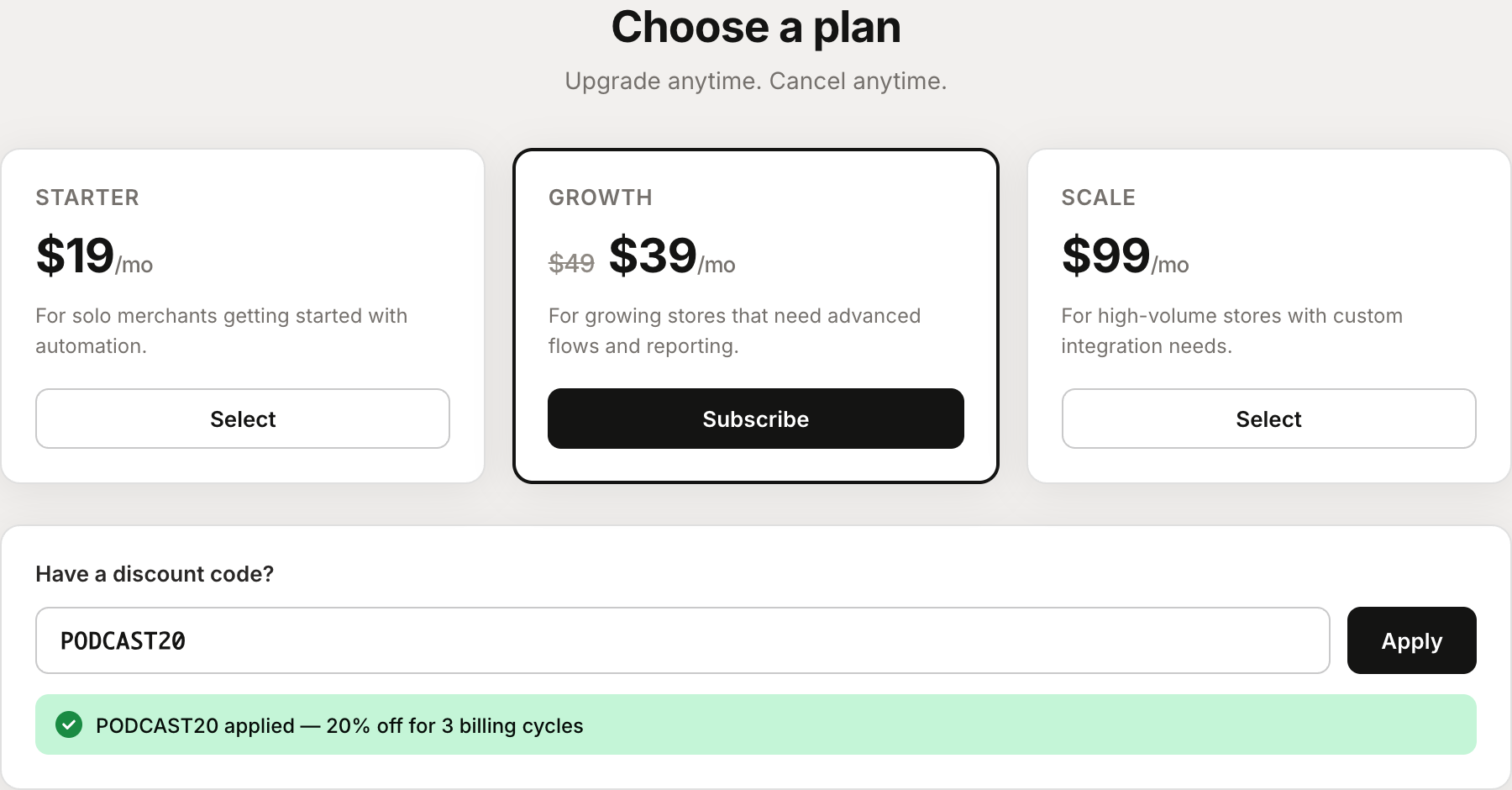
Once saved, merchants see a discount code input on the plan picker. When they enter a valid code and click Apply, the plan prices update live to show the discounted amount, and the code is passed through to the subscription they create.
Option B: Custom billing UI with the API
If you've built your own plan picker, use the POST /v1/discounts/apply endpoint to validate a code before subscribing. Passing planId is optional but recommended — it validates plan compatibility and returns the pre-calculated discounted price so you can show it in your UI. See the App API reference for full authentication details.
POST https://appapi.heymantle.com/v1/discounts/apply
X-Mantle-App-Id: <your app id>
X-Mantle-Customer-Api-Token: <customer api token from /identify>
Content-Type: application/json

{
  "code": "PODCAST20",
  "planId": "plan_abc123"
}
The X-Mantle-Customer-Api-Token header comes from your identify call — the same one you already use to initialize the Mantle SDK for a customer.
A successful response returns the validated discount:
{
  "discount": {
    "id": "disc_xyz789",
    "name": "May 2026 podcast discount",
    "code": "PODCAST20",
    "percentage": 20,
    "amount": null,
    "amountCurrencyCode": null,
    "durationLimitInIntervals": 3,
    "discountedAmount": 39.20
  }
}
discountedAmount is only present when you pass planId. It's the post-discount price you can show the merchant ("$39.20/mo instead of $49/mo").
Take discount.id from the response and pass it as discountId to your existing subscribe call. Mantle applies it to the Shopify subscription that's created.
Handling plan changes
When a merchant upgrades or downgrades to a non-flex plan, Shopify creates a brand-new subscription. A discount attached to the old subscription doesn't automatically carry over to the new one, so it silently disappears unless something re-attaches it. (Flex billing plans transfer their discount automatically — this only applies to standard plan changes.)
Put the code input on your plan-change UI, not just on initial subscribe. You have two options:
Let the merchant re-enter the code. Simplest. Works fine for merchants who remember their code or have it in an email.
Pre-fill from the previous subscription's applied discount. Look up the customer's current subscription, grab the
code, and drop it into the input so the merchant just clicks Apply. Zero effort on their end.
Error handling
When POST /v1/discounts/apply can't apply a code, it returns a 400 or 404 with a structured error. Each case has an errorCode for programmatic handling and a human-friendly message you can surface directly to merchants.
| errorCode | Message | Fires when |
|---|---|---|
DISCOUNT_CODE_REQUIRED | Discount code is required | The request body is missing a code or it's an empty string. |
DISCOUNT_NOT_FOUND | Discount code not found | No active discount matches the code for this app. |
DISCOUNT_NOT_STARTED | This discount is not yet active | The discount has a startsAt date that's still in the future. |
DISCOUNT_EXPIRED | This discount has expired | The discount has an endsAt date that's already passed. |
DISCOUNT_MAX_REDEMPTIONS | This discount has reached its maximum uses | timesRedeemed has hit maximumRedemptions. |
DISCOUNT_NOT_ELIGIBLE | You're not eligible for this discount | The discount is scoped to a specific customer who isn't this one, or requires tags this customer doesn't have. |
DISCOUNT_PLAN_MISMATCH | This discount cannot be applied to the selected plan | The discount is restricted to a specific plan and the request's planId is a different plan. |
DISCOUNT_DELETED | This discount is no longer available | The discount was soft-deleted since the code was issued. |
The messages are written to be shown as-is. If you want to customize them, switch on
errorCodeso you won't break if Mantle's default copy changes.
Relationship to "Automatically apply to new subscriptions"
Discount codes and auto-apply are independent — a discount can have either, both, or neither. If a merchant enters a code, the code-entered discount wins over any discount that auto-apply would have picked up. Most teams moving to code entry turn auto-apply off anyway: the merchant entering the code becomes the scoping mechanism, so you don't need availability rules doing double duty. Auto-apply still makes sense for broad promotions where every new subscriber should get the same deal.
Go further
Discounts overview — full reference for discount fields, durations, and restrictions.
Hosted billing — configure your hosted billing pages end-to-end.
Subscribe API — pass
discountIdwhen creating a subscription from your own UI.App API reference — authentication, all endpoints, and response schemas.