
Sales commissions
Mantle Sales includes a complete commission tracking system. Set up commission structures for your sales team, track earnings automatically, and manage payouts—all in one place.
How commissions work
Commissions in Mantle are tied to deals and transactions. When a deal closes or generates revenue, commissions are calculated based on your configured structure and credited to the deal owner.
The commission flow:
- Configure – Set up commission structures (percentage, flat rate, etc.)
- Earn – Commissions accrue as deals close and generate revenue
- Track – View earnings by user, deal, or time period
- Pay – Generate and process payout batches
Setting up commissions
Configure commissions during onboarding or in Sales → Settings → Commissions.
Commission structure options
Mantle supports several commission types:
| Type | Description |
|---|---|
| Percentage | A percentage of the deal value or revenue |
| Flat rate | A fixed amount per deal or transaction |
| Tiered | Different rates based on deal size or volume |
What triggers commissions
Commissions can be tied to different events:
- App installation – When a customer installs your app
- Subscription start – When a customer starts a paid subscription
- Transaction – When revenue is collected
- Deal closed – When a deal moves to Closed Won
Configuring your first commission structure
- Go to Sales → Settings → Commissions
- Click Configure commissions
- Select the commission type (percentage, flat rate, etc.)
- Set the rate or amount
- Choose what triggers the commission
- Save your configuration
Tracking commissions
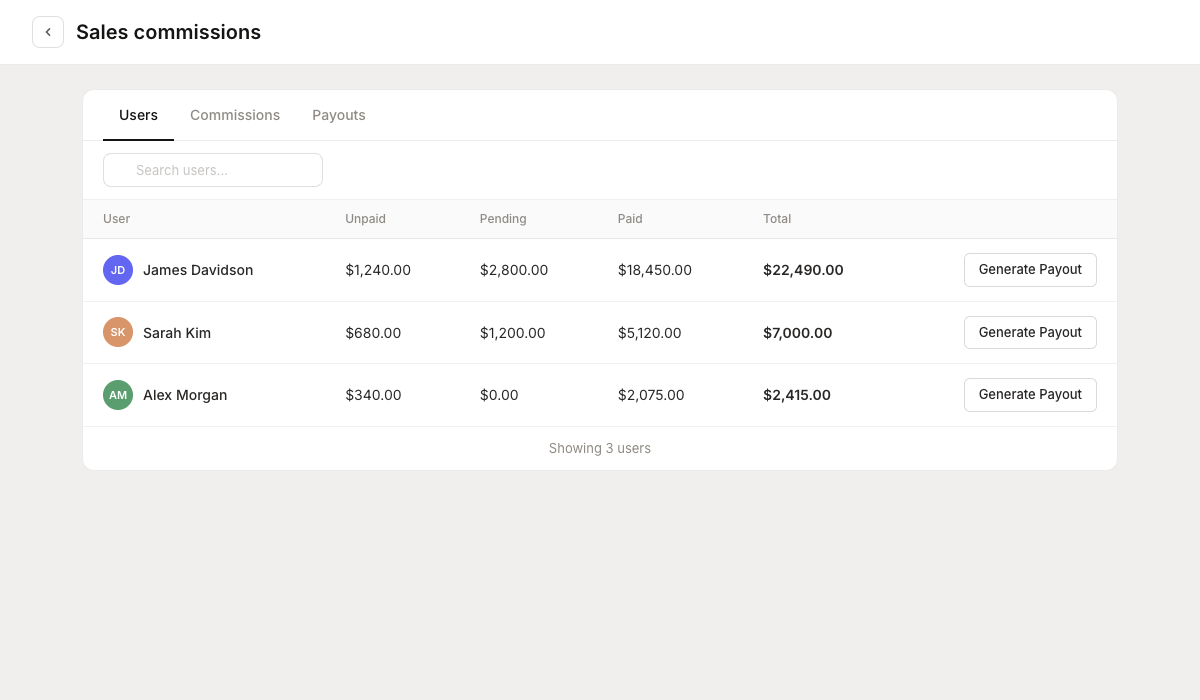
View commission data in Reports → Sales Commissions. The report has three tabs:
Users tab
See commission totals by team member:
- Total earned (all time)
- Earned this period
- Pending payout
- Paid out
Commissions tab
View individual commission records:
- Associated deal
- Customer
- Commission amount
- Date earned
- Payout status
Filter by:
- Date range
- Team member
- Payout status
- Deal flow
Payouts tab
Track payout batches:
- Payout period
- Total amount
- Status (pending/paid)
- Payment date
Managing payouts
When you're ready to pay commissions, generate a payout batch.
Generating a payout
- Go to Reports → Sales Commissions → Payouts
- Click Generate payout
- Select the period (commissions earned through a certain date)
- Review the payout summary
- Confirm to create the payout batch
The payout batch includes all unpaid commissions for each team member through the selected date.
Payout details
Each payout batch includes:
- Period – The date range covered
- Amount – Total payout amount
- Commissions – Number of commission records included
- Users – Team members receiving payment
- Status – Pending or paid
Marking payouts as paid
After you've processed payments outside of Mantle (via payroll, bank transfer, etc.):
- Open the payout batch
- Click Mark as paid
- Enter the payment date
- Add optional notes (payment method, reference number, etc.)
- Confirm
This updates the status and records when commissions were paid.
Commission reports
Exporting commission data
Export commission records for accounting or payroll:
- Go to the Commissions tab
- Apply any filters needed
- Click Export
- Choose your format (CSV, Excel)
Exports include all commission details: user, deal, customer, amount, date, and payout status.
Commission analytics
Use commission data to understand sales performance:
- Top earners – Who's closing the most valuable deals?
- Commission trends – How are earnings trending over time?
- Channel performance – Which acquisition channels drive the most commissionable revenue?
Deal owners and commissions
Commissions are credited to deal owners. Here's what you need to know:
Setting deal owners
Assign an owner when creating or editing a deal. The owner:
- Receives commission credit for that deal
- Appears as the responsible team member in reports
- Can be filtered in the pipeline view
Multiple owners
If a deal has multiple owners, commission is split according to your configuration. By default, the primary owner receives full commission.
Changing owners
If you change a deal's owner after commissions have been earned, past commissions remain with the original owner. Future commissions go to the new owner.
Best practices
Define clear rules
Document when commissions are earned and how they're calculated. This prevents disputes and ensures fairness.
Reconcile regularly
Review commission records monthly. Catch any discrepancies early before payout time.
Align with deal stages
Consider when commissions should be earned. Paying on Closed Won is common, but some businesses prefer paying on revenue collection to reduce risk.
Keep owners updated
Ensure deals have accurate owners. Orphan deals (no owner) won't generate commission records.
Troubleshooting
Missing commissions
If a deal isn't generating commissions, check:
- Does the deal have an owner assigned?
- Is the commission structure configured for this deal type?
- Has the deal reached the stage that triggers commissions?
Incorrect amounts
Commission amounts are based on deal value or transaction amount. If amounts seem wrong:
- Verify the deal amount is correct
- Check your commission percentage/rate
- Review the transaction amounts if commission is revenue-based
Next steps
- Working with deals – Assign owners and track deal values
- Invite and manage your team – Add team members who earn commissions