
Agent MCP Overview
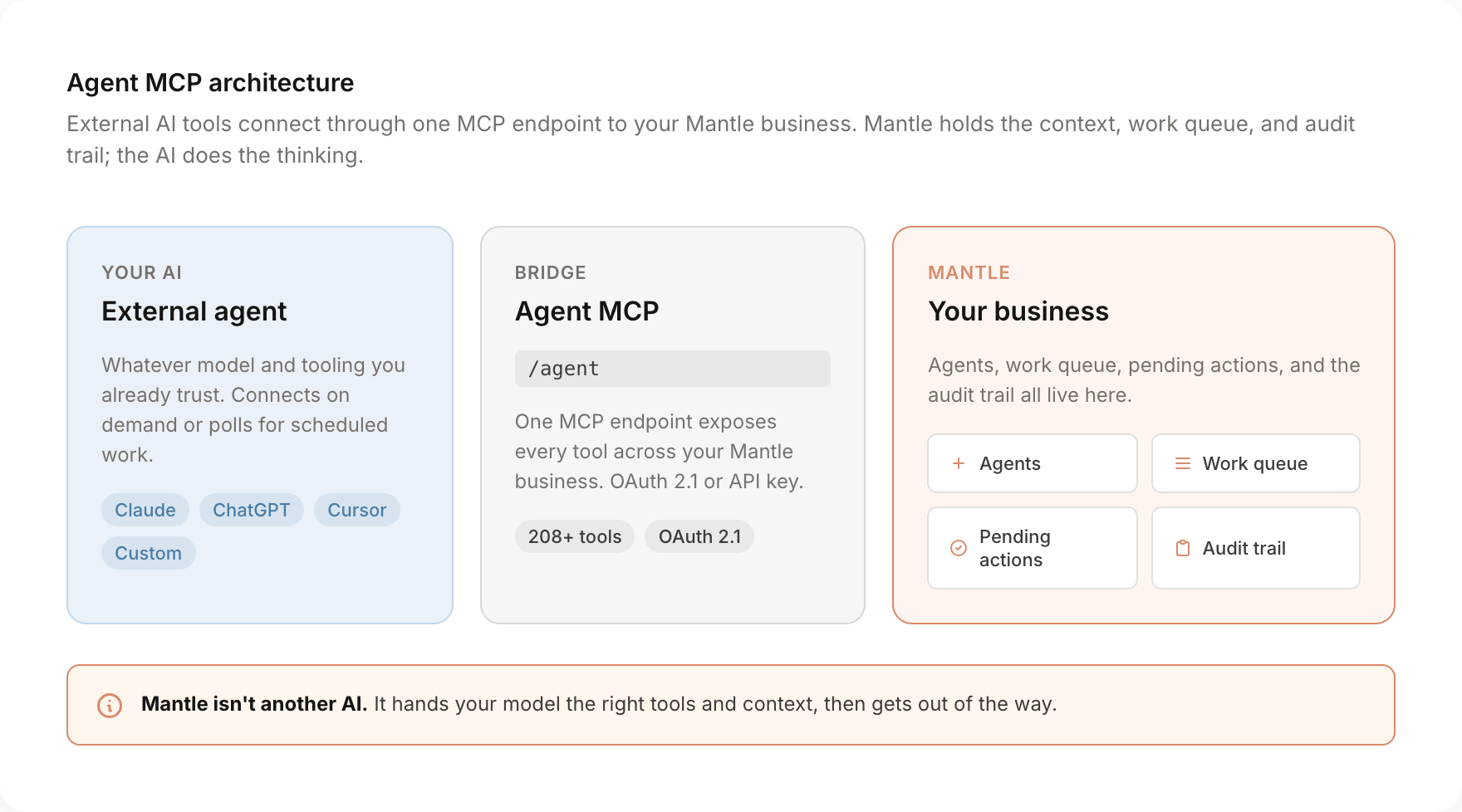
MCP (Model Context Protocol) is an open standard that lets AI tools connect to external systems. Mantle's Agent MCP is a single endpoint that exposes your entire Mantle business, customers, subscriptions, revenue, support, flows, affiliates, docs, all of it, to any MCP-compatible AI tool.
It replaces the older per-domain MCPs (Core, Growth, Docs Management). One connection, one credential, every tool in Mantle. If you previously connected your AI to multiple Mantle URLs, you can swap them out for a single /agent endpoint.
Bring your own AI
You don't need to set up another agent to get value from Mantle. The Agent MCP works with whatever AI tool you already trust. Claude, ChatGPT, Cursor, your own custom setup. Anything that speaks MCP can connect to it.
Mantle isn't another AI. It hands your model the right tools and the right context, then gets out of the way. Your AI does the thinking; Mantle gives it the keys to your business.
What it actually does
Once your AI is connected, it can:
- Read your customers, subscriptions, MRR, churn signals, and 50+ analytics metrics
- Write to flows, send replies in the helpdesk, manage affiliates, update plans
- Pull help center docs, draft new ones, or update existing pages
- Pick up scheduled work from a queue and process it autonomously, with human approval on anything you choose to gate
The two ways to use it
Conversational (chat with your business)
You're in Claude or ChatGPT and you ask questions. The agent picks up the call, hits Mantle, gets the answer, and shows it to you.
"What's MRR for the last six months, broken out by Shopify plan tier?"
"Which customers churned last week and what was their last support ticket?"
"Draft a welcome flow for new trial users on the Growth plan."
For mutations (anything that writes data, sends emails, edits flows), the agent will either auto-approve based on your autonomy settings or stage a pending action that you confirm in the Mantle UI.
Scheduled / autonomous (work queue)
You configure an Agent in Mantle with a mandate ("monitor customer health"), give it Goals on a schedule ("every Monday morning, flag accounts with a churn risk above 70"), and your external AI tool polls Mantle's work queue on a cron.
When work shows up, it claims the item, runs the tools it needs, and reports back with results, observations, and learnings. Anything you've gated still goes through approval.
This is "interface in, interface out": Mantle queues the work, your AI does the thinking, Mantle stores the audit trail.
How it's different from the old MCPs
If you set up Mantle's MCPs before, you connected to separate URLs for Core, Growth, and Docs Management, and each one exposed a flat list of tools. The Agent MCP replaces that with a single connection that:
- Uses the agents you've configured in Mantle. Your tool list, codebases, rules, and connected MCPs follow whichever agent the AI selects. Switching agents is one tool call.
- Has a work queue built in. Schedule recurring tasks, trigger work from events, and let your external AI process them. The old MCPs were stateless.
- Stages writes for human approval. Set autonomy per agent: auto-approve everything, hold writes for confirmation, or queue every action for review. Approvals happen in the pending actions queue. The old MCPs couldn't do this.
- Gives a full audit trail. Every tool call, every approval, every work item is logged against the agent that ran it.
- Lets the agent control its own detail level. Tool schemas load on demand instead of paying token cost on every definition up front.
Security model
The connection authenticates with OAuth 2.1 (recommended) or an API key tied to your Mantle account. Permissions follow the user, not a shared service token, so revoking access is one click and access is always organization-isolated.
For mutations, the agent's autonomy settings decide whether the action runs immediately, waits for approval in the pending actions queue, or is blocked entirely. You set this once per agent.