
How usage billing works
How usage billing works
Usage-based billing has a lot of moving parts: events get sent in, rolled up into charges, submitted to Shopify or Stripe, and eventually paid. When something goes sideways — a wrong event, an unexpected pending charge, a customer hitting their cap — it helps to know exactly what's happening behind the scenes.
This guide walks through the full lifecycle of a usage charge, what the rolling billing period actually means, and how to recover when something charges incorrectly.
The lifecycle of a usage event
Every usage charge in Mantle goes through the same stages, regardless of whether you're rolling things up daily, weekly, or monthly.
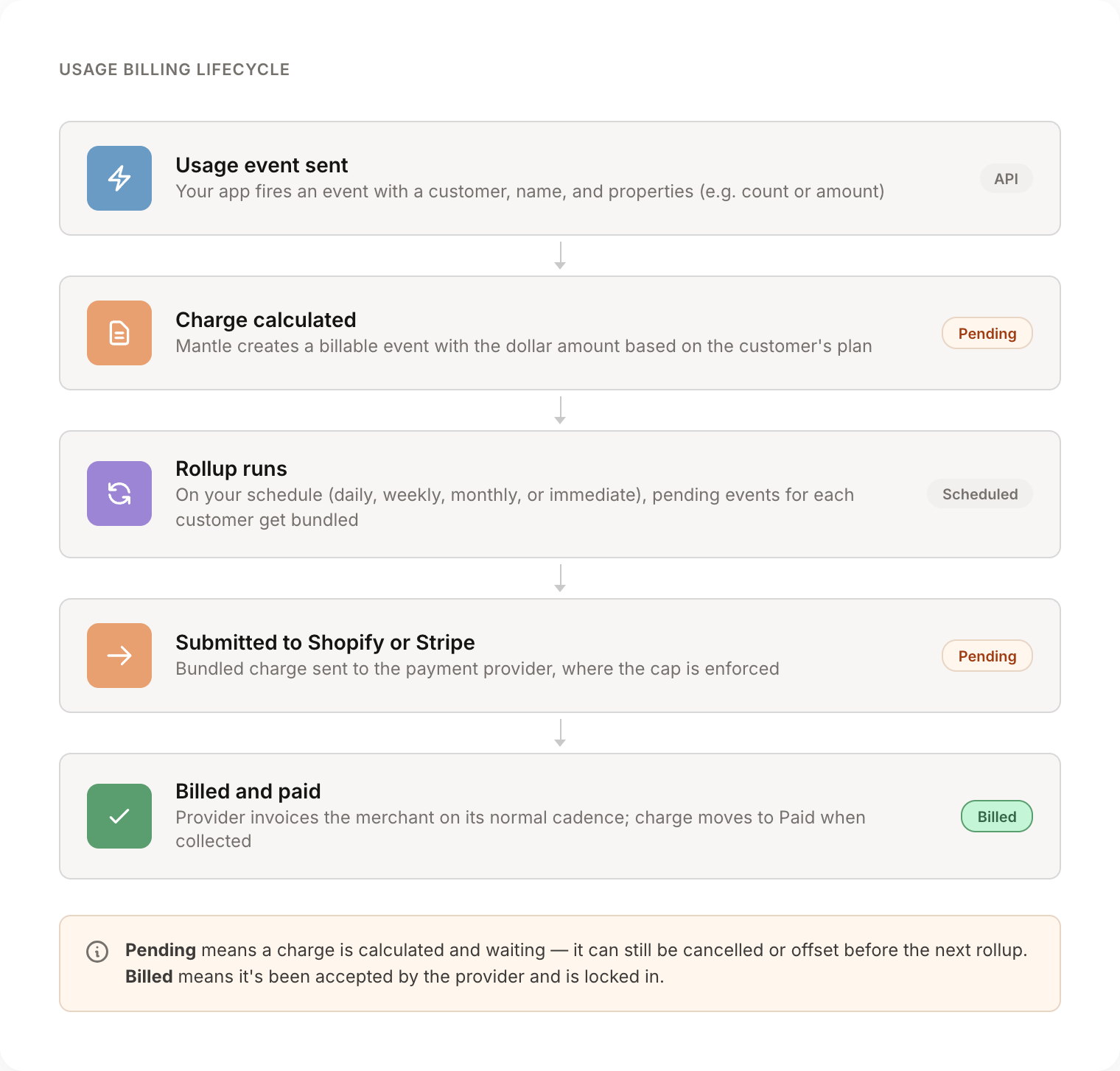
Here's what each stage means:
- You send a usage event. Your app calls the Mantle API (or fires an event from a flow) with an event name, a customer, and properties like
countoramount. Mantle stores this as aUsageEventrecord. - Mantle calculates the charge. Based on the customer's plan and the matching usage charge configuration (per unit, per unit with limits, package, percentage), Mantle creates a
BillableEventwith the dollar amount this event should be billed for. At this point the event is Pending — calculated but not yet sent to the payment provider. - The rollup runs. On your configured schedule (immediately, daily, weekly, or monthly), Mantle's rollup job collects all pending billable events for each customer and submits them as a single usage record to Shopify or as a metered usage report to Stripe.
- The provider responds. If the charge succeeds, the billable event is marked Billed with a timestamp. If the charge is rejected (most commonly because it exceeds the cap), Mantle handles it according to your plan's rollover settings — more on that below.
- The merchant pays. Shopify and Stripe handle collection on their normal billing cycle. Once paid, the charge moves to Paid in your reports.
Rollup frequency in practice
Rollup frequency is set on the app — not per-plan — so it applies to every plan with usage charges. To change it, go to Your app → Settings → Usage billing and pick a value from the Rollup frequency dropdown:
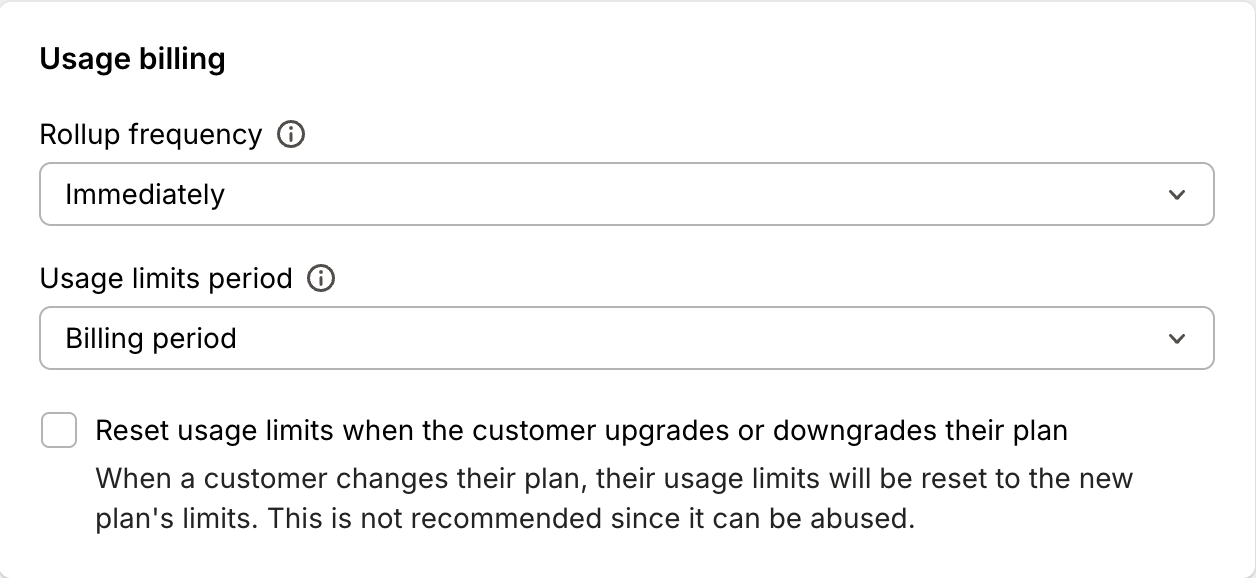
- Immediately — Each event is submitted as its own charge as soon as it comes in. Best for low-volume, high-value events.
- Daily — All of yesterday's pending events for a customer get combined into a single charge once per day. Most common for per-unit pricing.
- Weekly — Pending events from the past week are combined into one weekly charge.
- Monthly — Pending events accumulate for the whole month and get charged in one bundle at the end.
Lower frequencies mean fewer line items on the merchant's invoice but bigger individual charges, which makes them more likely to bump up against the cap.
Capped amounts and the rolling billing period
When a customer subscribes to a plan with usage charges, they authorize a capped amount — the maximum they'll pay for usage in a single billing period. This is a hard ceiling enforced by Shopify itself.
The important thing to understand: Shopify's billing period is rolling, not calendar-month. The cap resets every 30 days from the customer's subscription start date — not on the 1st of each month. So a customer who subscribed on March 14 has a billing period that runs March 14 → April 13, then April 14 → May 13, and so on.
Inside each period, Shopify tracks a balanceUsed value that climbs as charges go through. Once balanceUsed hits the cap, no more charges will succeed in that period, regardless of what your app sends. When the period resets, balanceUsed returns to zero and the customer can be charged again up to the cap.
What happens when a charge exceeds the cap
This is where things get interesting. When Mantle's rollup tries to charge an amount that would push the customer over their cap, Shopify rejects the entire charge with "Total price exceeds balance remaining".
Mantle catches that rejection and does two things:
- Tries again with a smaller amount. Mantle calculates the remaining cap (
cappedAmount – balanceUsed) and uses a binary-search approach to find the largest subset of pending events that fits under the remaining headroom. Those get billed; the rest stay pending. - Decides what to do with the leftovers based on your plan's Roll over pending usage setting.
Rollover behavior for pending events
This is one of the most important settings in usage billing, and it's easy to miss because the default is hidden.
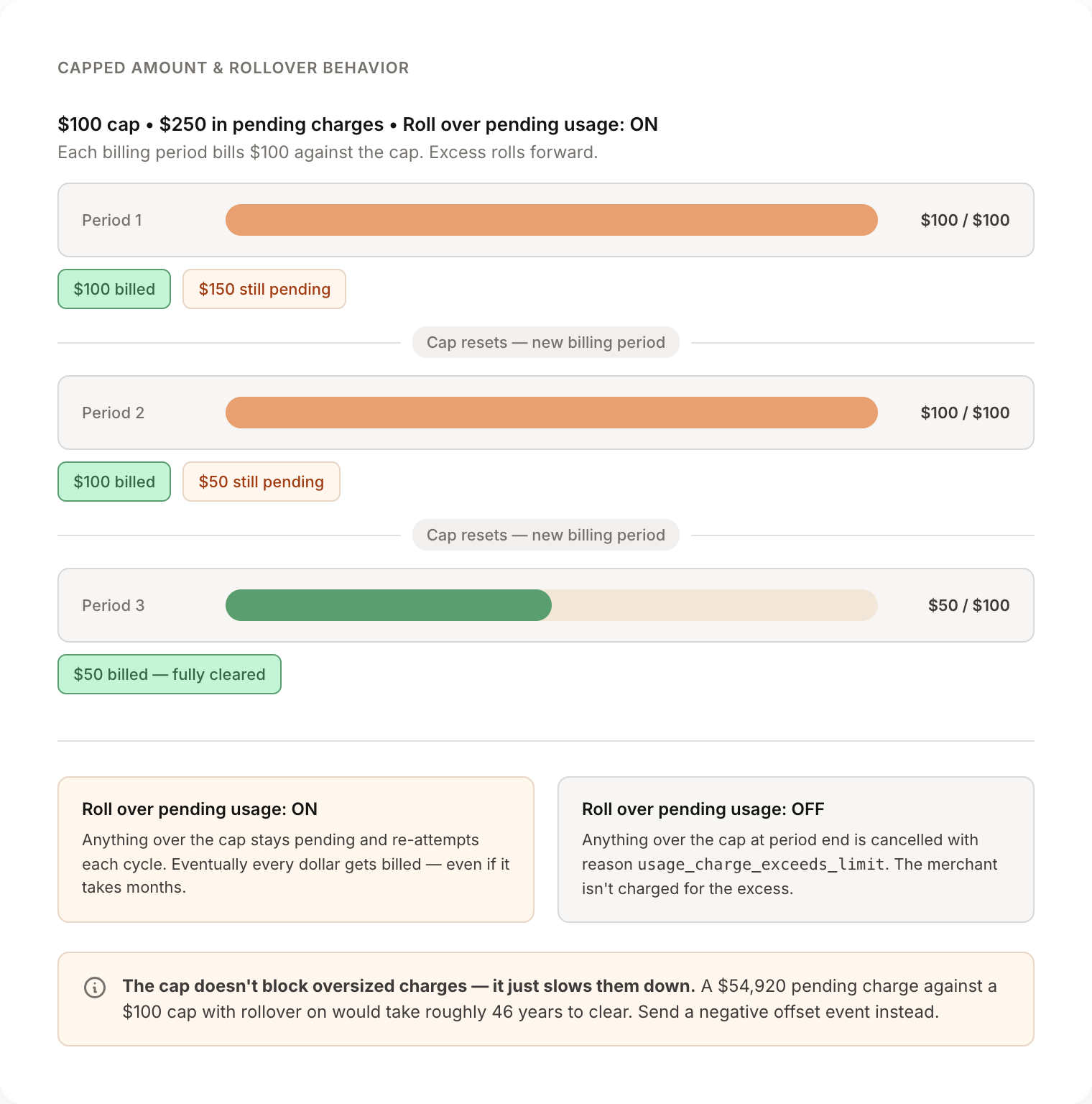
By default, Roll over pending usage is enabled. Pending events that didn't fit under the cap stay pending and get re-attempted on every subsequent rollup. Once the billing period rolls over and balanceUsed resets, those leftover pending events get a fresh shot at being billed.
This means a customer with a $100 monthly cap and a single pending charge of $54,920 would be billed roughly $100 every period, indefinitely, until the pending amount cleared. The cap doesn't block the charge — it just slows it down.
If Roll over pending usage is disabled, anything that doesn't fit under the cap at the end of the billing period gets cancelled and marked with a usage_charge_exceeds_limit reason code. The merchant doesn't get charged for the overage, and the pending event stops trying.
Which setting is right depends on how you want to handle bursts of usage:
- Rollover on — Best when usage is a real obligation and you want every dollar eventually collected, even if it takes multiple periods.
- Rollover off — Best when overage is more like a soft alert and you'd rather forgive excess usage than chase it indefinitely.
Recovering from an accidental or wrong charge
This comes up more often than you'd think: someone fires a usage event with the wrong event name, the wrong count, or against the wrong customer, and now there's a pending charge sitting on a customer's account that shouldn't be there.
The cleanest fix is to send a negative offset event: another usage event with the same event name and customer, but with a negative count or amount that cancels out the original.
For example, if you accidentally sent tracked_skus with count: 10989 for $54,920, send a follow-up tracked_skus event with count: -10989. Mantle will create an offsetting billable event for –$54,920, and at the next rollup the two will net to zero. Your customer never sees a charge.
A few things to know:
- Both events will show as Pending in the Usage events report until the rollup runs. They cancel each other at submission time, not at creation time.
- The original event keeps its Pending badge. It doesn't retroactively flip to "cancelled" — it just gets paired with the offset and submitted together.
- If the original has already been billed, a negative offset event will show up as a credit on the customer's next charge.
If you can't send a negative event (for example, the original event was already partially billed and you need the customer fully refunded), reach out to support — there are a few additional levers we can pull on our side.
Charge status reference
Here's what each status in the Usage and one-time charges report actually means:
| Status | What it means |
|---|---|
| Pending | Calculated and waiting to be submitted at the next rollup. Can still be cancelled or offset. |
| Billed | Submitted to Shopify or Stripe and accepted. Locked in — the merchant will be invoiced. |
| Due | On the merchant's invoice, waiting for payment. |
| Paid | Collected and settled. |
| Refunded | Refunded through Stripe. (Stripe only.) |
| Void | Voided through Stripe. (Stripe only.) |
Pending → Billed happens at rollup time. Billed → Due → Paid happens on Shopify or Stripe's normal billing cadence, which Mantle doesn't control.
Common patterns to watch for
- A pending charge that's been sitting for days — usually means it's bumping the cap. Check the customer's
balanceUsedagainst their plan's capped amount, and consider whether the cap needs to be raised. - Pending charges that disappear without billing — likely
Roll over pending usageis disabled and the period rolled over. Check the billable event'sbillReasonCodeforusage_charge_exceeds_limit. - Suspiciously large pending amounts — almost always a wrong event name or wrong properties. Use a negative offset before the rollup runs to nullify it without the customer ever seeing a charge.
Need help untangling a specific charge? Reach out and we'll dig in with you.