
Agent MCP in action
Once your AI is connected to the Agent MCP, three kinds of work open up: asking things, changing things, and running things on autopilot. Each one uses the same connection. The difference is just how much you let your AI do on its own.
Ask things in plain English
Instead of clicking through six dashboards, you ask. Your AI figures out which Mantle data to pull, combines it, and writes you the answer.
"Show me my top ten customers by MRR and flag the ones with open support tickets."
"Which apps had the biggest revenue dip last week, and what changed about those installs?"
"Find every customer who installed in the last 30 days but never hit our activation event."
You don't pick the report. You don't write a query. You ask the question and your AI assembles the answer from your Mantle data, your support history, your usage events, your codebase, whatever's relevant.
The same connection works for any question your business data can answer.
Change things, with you in the loop
You can also tell your AI to act, not just answer:
"Send the three flagged customers a check-in from Sarah."
"Add the trial-extension discount to anyone who downgraded last month."
"Update the welcome flow to mention the new analytics page."
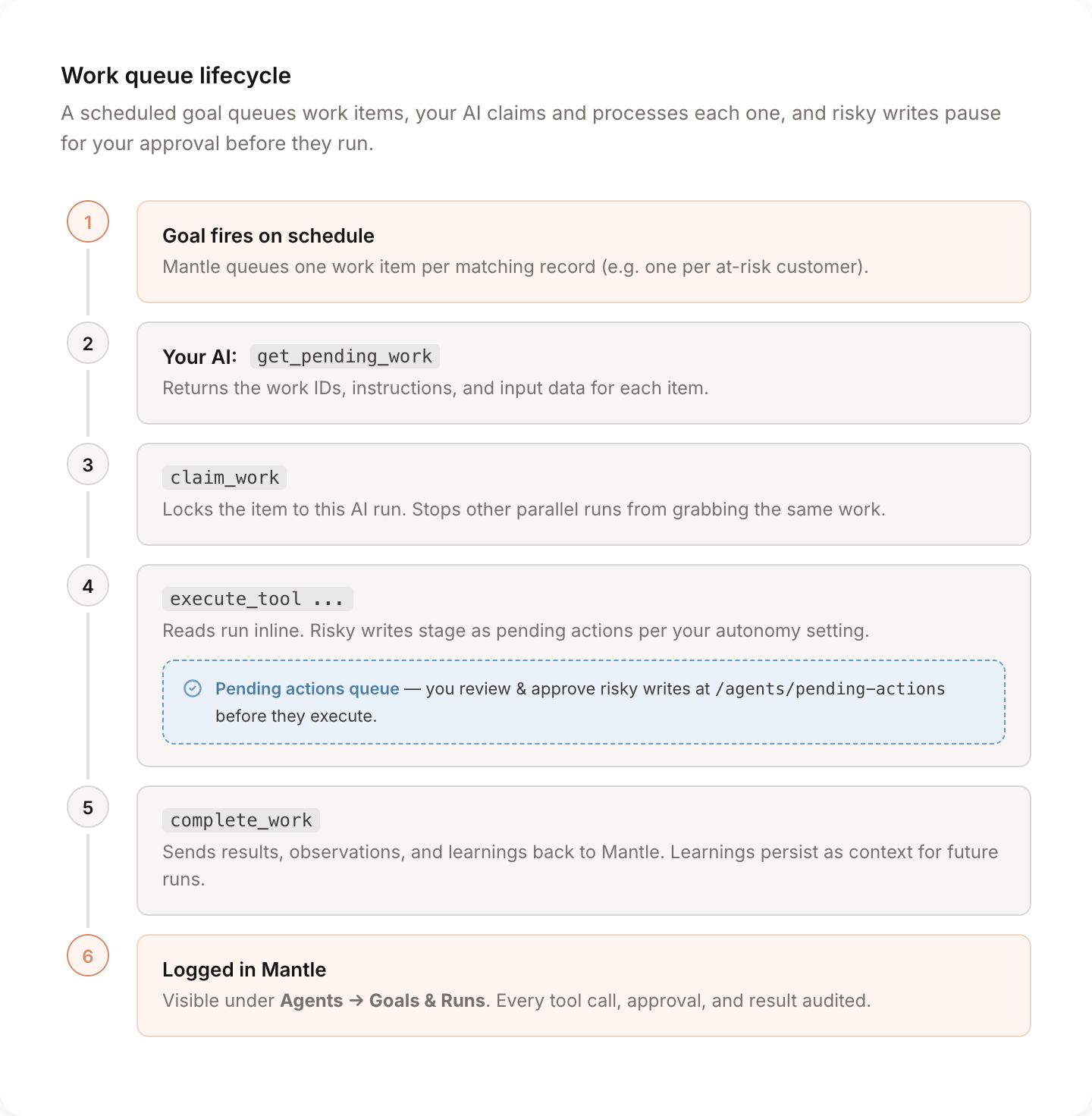
Anything that changes data (sending email, editing a flow, updating customers, charging) pauses for your approval before it runs. You'll find the proposed action at Agents → Pending Actions, see exactly what it'll do, and approve or reject. Nothing risky goes out without you.
For low-stakes work you trust, dial autonomy up so routine writes go through automatically. For everything sensitive, the default keeps a human in the loop.
Schedule it and walk away
The big payoff is letting your AI do work overnight while you sleep.
You set up an Agent in Mantle with a mandate ("watch for churn risk") and a schedule ("every Monday morning, review every paying customer"). Your AI, whether that's Claude on a cron, ChatGPT on a scheduled task, or your own setup, wakes up, picks up the queued work, and processes it.
By the time you're at your desk Monday, the work is done. Drafts written. Customers segmented. Briefings compiled. Nothing was sent or changed without your say-so, but everything that could be prepared, was.
Patterns that work well
Monday-morning briefing
One agent, one weekly Goal. MRR delta, churn this week, top new accounts, top at-risk accounts. By 9am you have a written summary waiting in Slack or your inbox, with links to the customers and metrics it pulled from.
Helpdesk triage
New ticket lands. Your AI reads it, pulls the customer's subscription, recent activity, and past tickets, drafts a reply, and stages it for your support team to approve. The team sees a one-click approve on a fully-written response instead of a blank reply box.
Doc maintenance
Weekly Goal that finds help center articles older than 90 days. Your AI checks them against the current product, drafts the updates, and queues each change for review. The docs stay fresh without anyone owning that as a job.
Affiliate health checks
Monthly Goal that creates one work item per top-tier affiliate. Your AI pulls referral counts, payout status, and recent activity, then drafts a personalized check-in for any affiliate showing dropoff. You approve the ones that look good and skip the rest.
Re-engagement campaigns
Monthly Goal that finds dormant trial users. Your AI looks at what they did before going quiet, drafts a message tailored to that activity, and stages it. Different angle for someone who churned at activation versus someone who paid for two months and stopped logging in.
Onboarding nudges
Daily Goal that finds new sign-ups stuck on a setup step. Your AI sends a contextual nudge specific to where they got stuck, instead of the generic "finish your setup" email everyone ignores.
Pricing experiments and rightsize checks
Agent watches for customers consistently exceeding their plan limits or sitting on plans far smaller than their usage warrants. Drafts a tailored upgrade message, stages it, you approve it.
Switching agents mid-conversation
If you've configured multiple agents in Mantle (one for support, one for marketing, one for revenue), your AI can switch between them mid-conversation:
"Switch over to my Growth agent and pull last month's traffic source performance."
The conversation hands off, the new agent's mandate and tool list take over, the rest of your chat happens in that context. Same connection, different specialist.
Things worth knowing
- Multiple AIs can share the queue safely. Work items lock when claimed, so two parallel runs won't both pick up the same item.
- Pending actions expire after 24 hours by default. If you don't approve in time, the call won't run and the agent gets a clean rejection signal.
- Dry-run mode is supported. Test a new Goal before letting it loose. Mutations simulate but don't execute.
- Everything is audited. Every tool call, every approval, every result is logged against the agent that ran it. You always know what was done and why.
- Learnings persist. When your agent finishes work, it can record patterns it noticed. Those get passed back into future runs as context, so the agent gets sharper over time.