
AI-Powered Support
Support doesn't scale when every ticket requires manual attention. AI-powered support in Mantle lets you create intelligent agents that automatically analyze tickets, suggest responses, and handle routine inquiries—so your team can focus on the conversations that truly need a human touch.
The Support Sidekick
Mantle ships with a built-in support agent called the Support Sidekick. It's designed specifically for help desk workflows and comes pre-configured with the right tools and context to start helping immediately.
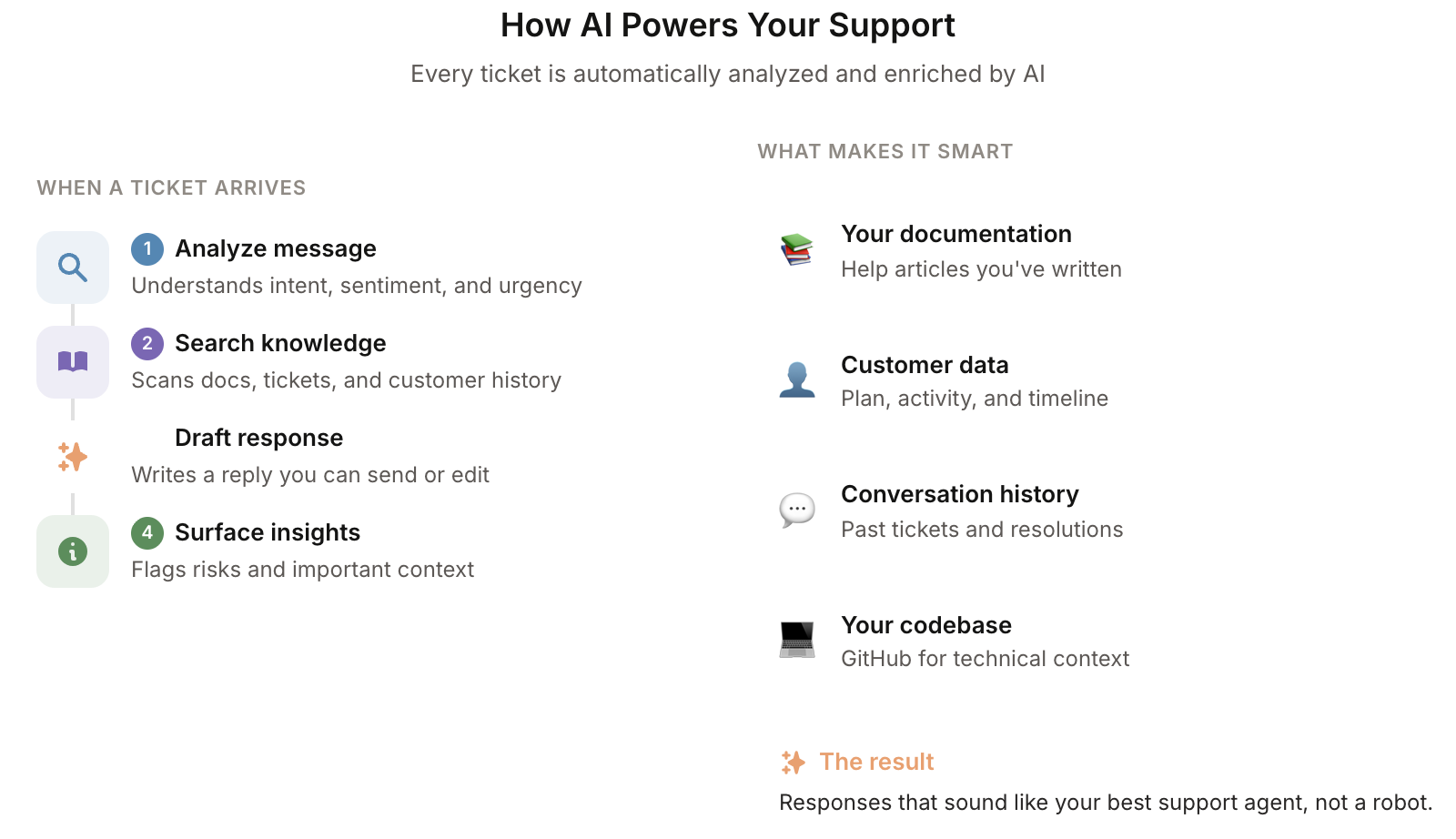
When a ticket comes in, the Support Sidekick follows a structured workflow:
Context gathering — Pulls the customer's plan, subscription status, usage history, and recent activity
Research — Searches your documentation, codebase, and similar resolved tickets to understand the issue
Classification — Determines if it's a simple answer, feature limitation, bug, unclear issue, or complex setup question
Response — Drafts a complete response for your review, or recommends escalation with context
The Sidekick is smart about different question types. For "how do I" questions, it provides instructions and links to documentation rather than pulling live data. For bug reports, it researches the codebase and flags likely causes. For billing questions, it checks the customer's actual subscription and transaction history.
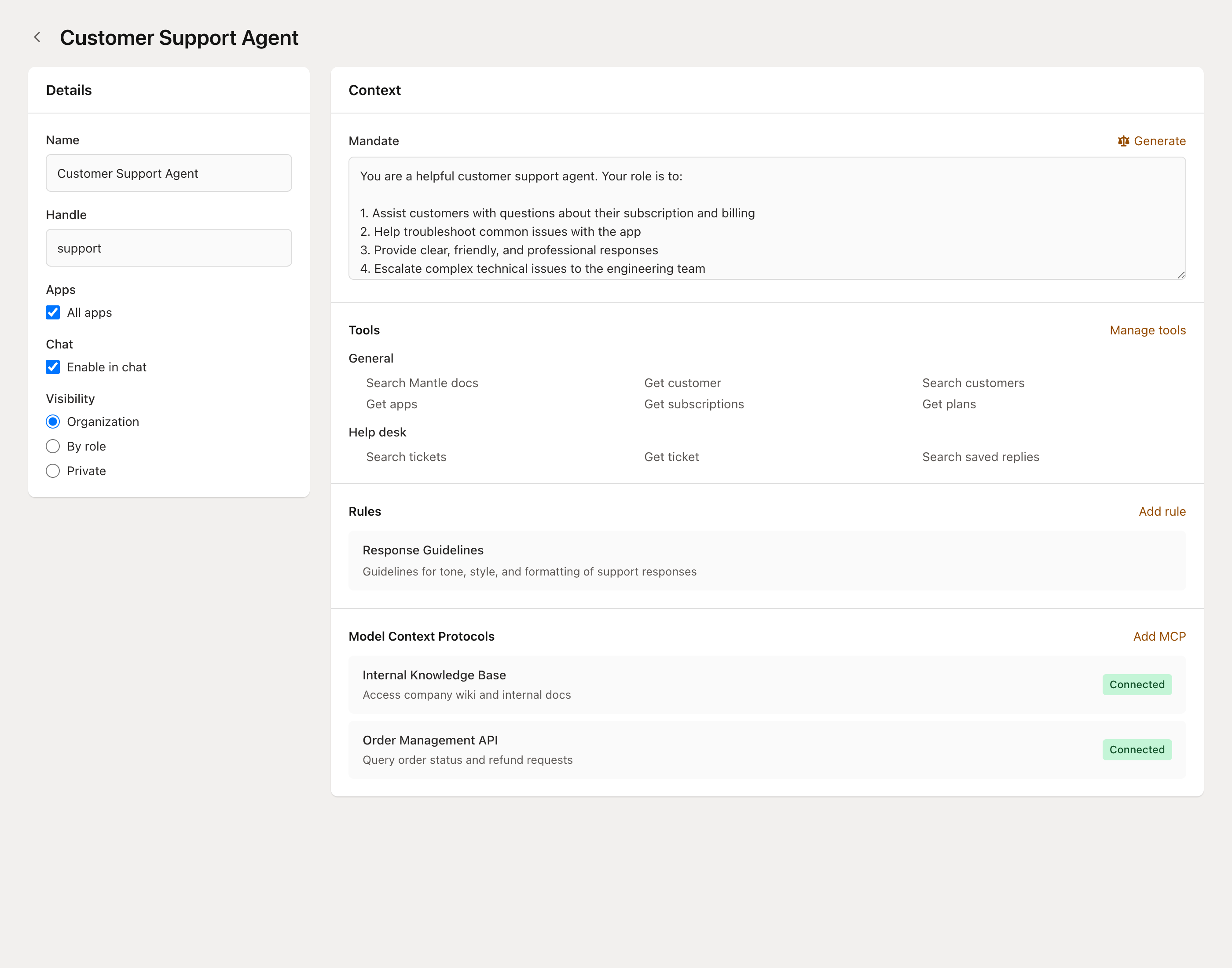
To customize how the Support Sidekick behaves—adjusting its tone, adding product-specific guidelines, or connecting your codebase—see Configuring your agents.
Getting started with AI support
AI support builds on Mantle's AI agents feature. The Support Sidekick is ready to use out of the box, but you'll get better results by giving it context about your product.
A well-configured support agent can:
Analyze incoming tickets and draft responses based on your documentation
Provide customer context and history at a glance
Identify escalation needs and customer sentiment
Handle routine questions through automated chat
Auto-tag tickets by topic for better routing and reporting
Auto-tagging and triage
When a new ticket arrives, Mantle can automatically tag it based on the content. This happens before any agent runs—it's a lightweight classification step that helps with routing and reporting.
Auto-tagging works by analyzing the ticket content against your organization's tag list. It learns from your previously tagged tickets to improve accuracy over time. Typically, each ticket gets 1–2 tags.
You can customize which tags are available in your organization's help desk settings. Common tags include:
Bug report, Feature request, How-to question
Billing, Account, Integration
Urgent, VIP customer
Auto-tagging is enabled by default. You can disable it in your organization settings if you prefer to tag tickets manually.
Response suggestions
When an AI agent analyzes a ticket, it generates a suggested response that appears directly in your help desk. These suggestions save time by drafting contextual responses based on the customer's message, your documentation, and the customer's history.
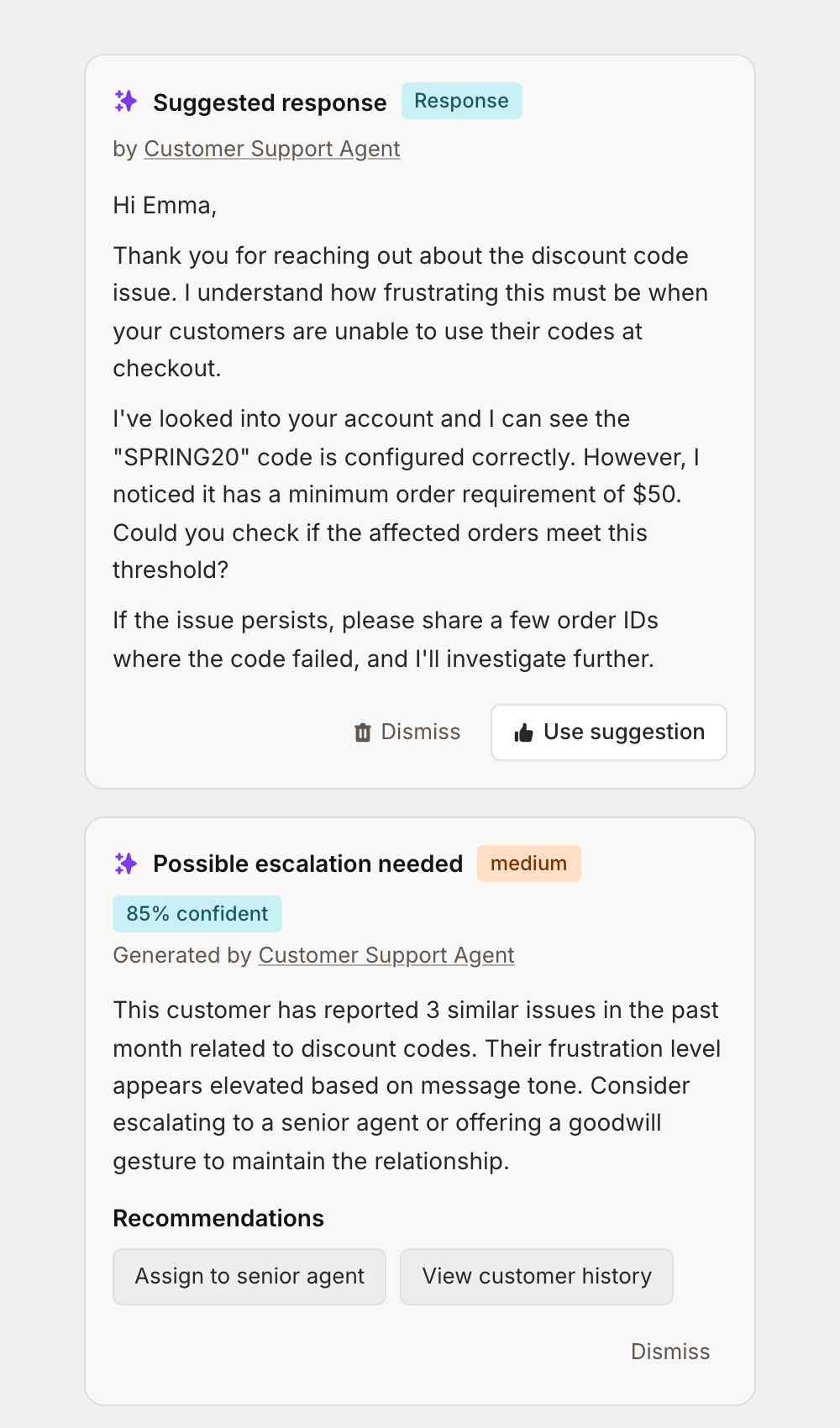
Every suggestion goes through a quality validation step before it's shown to you. The agent checks its own response for accuracy, tone, and completeness—and only surfaces it if it passes.
When a suggestion appears, you can:
Review and edit the response before sending
Use the suggestion as-is with one click
Dismiss it if it's not helpful
This keeps humans in the loop while dramatically reducing the time spent drafting responses to common questions.
Adding your codebase for technical support
For technical products, the best support comes from understanding the code itself. You can connect your codebase directly to your AI agent, giving it the ability to search through your actual implementation when helping resolve tickets.
When a customer reports a bug or asks how something works, your agent can search the relevant code, understand the logic, and provide accurate answers—not just generic responses.
Connecting your code
You can add codebases to your agent in three ways:
GitHub — Connect a repository directly from GitHub
GitLab — Connect a repository from GitLab
Upload — Upload a zip file of your codebase
Once connected, Mantle indexes your code for semantic search. Your agent can then search through files, functions, and logic to understand how your product actually works.
Your code stays secure
We take the security of your codebase seriously. When you connect a repository to Mantle:
Encrypted at rest and in transit — Your code is protected with industry-standard encryption throughout our infrastructure.
Isolated per organization — Your codebase is completely separated from other customers. There's no cross-contamination or shared access.
Indexed, not stored raw — We create vector embeddings for semantic search. Your raw source files aren't exposed or stored in plain text databases.
Minimal access scope — When connecting via GitHub or GitLab, we request only the permissions needed to read repository contents. We never write to your repositories.
You control what's connected — Choose specific repositories to connect. You can disconnect or delete indexed codebases at any time.
How agents use your code
With a codebase connected, your agent gains access to powerful code research tools:
Semantic search — Find code by meaning, not just keywords. Ask "where is payment processing handled?" and get relevant results even if the code doesn't contain those exact words.
Text search — Search for specific function names, error messages, or code patterns.
Hybrid search — Combine both approaches for comprehensive results.
File browsing — List files by directory or language, view file structure, and get repository statistics.
Reference tracking — Find where functions are defined and where they're used across the codebase.
This means when a customer reports "the sync fails after updating settings," your agent can search for sync-related code, understand the flow, and identify likely causes—dramatically improving the accuracy of its suggestions.
Insights and recommendations
Beyond response suggestions, AI agents can surface insights about tickets and customers. These might include:
Customer sentiment analysis
Escalation recommendations based on ticket history
Related tickets or recurring issues
Suggested actions like assigning to a specialist
Insights appear in the same sidebar as response suggestions, giving your team a complete AI-powered view of each conversation.
Automating with Flows
For more control over when and how AI agents run, use the Run AI agent action in Flows. This lets you:
Trigger agent analysis on specific events (new ticket, customer message, etc.)
Pass dynamic data to the agent using Liquid variables
Define a response schema to extract structured data
Use the agent's output in subsequent Flow steps
Combine with conditions to create sophisticated branching logic
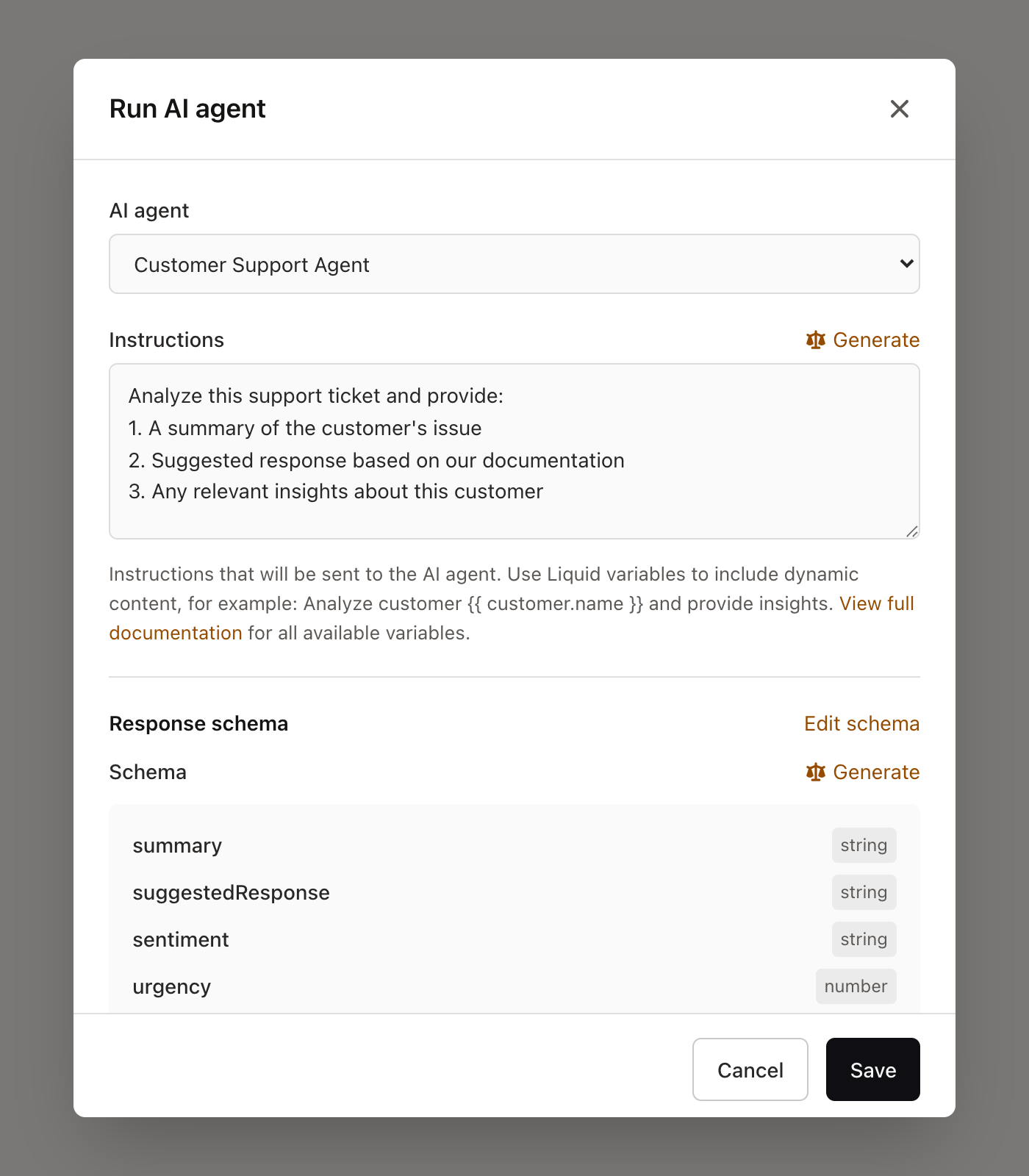
The response schema lets you structure the agent's output so you can use specific values in your Flow. For example, have the agent return a sentiment field and urgency score, then route tickets differently based on those values.
Common Flow patterns
Automatic ticket analysis: Trigger on "Customer message received" and have the agent analyze the ticket, then create a response suggestion for your team to review.
VIP routing: Trigger on new tickets, have the agent check the customer's plan and revenue, then automatically assign high-value customers to senior support.
Churn risk alerts: Trigger on customer events to analyze accounts and send Slack notifications when high-value customers show signs of churning.
AI-powered chat widget
Connect an AI agent to your chat widget to provide instant, automated responses to customer inquiries. When configured:
Customer sends a message through your support widget
The assigned AI agent analyzes the message and your documentation
Agent generates and sends a response automatically
If the agent can't resolve the issue, it can escalate to a human
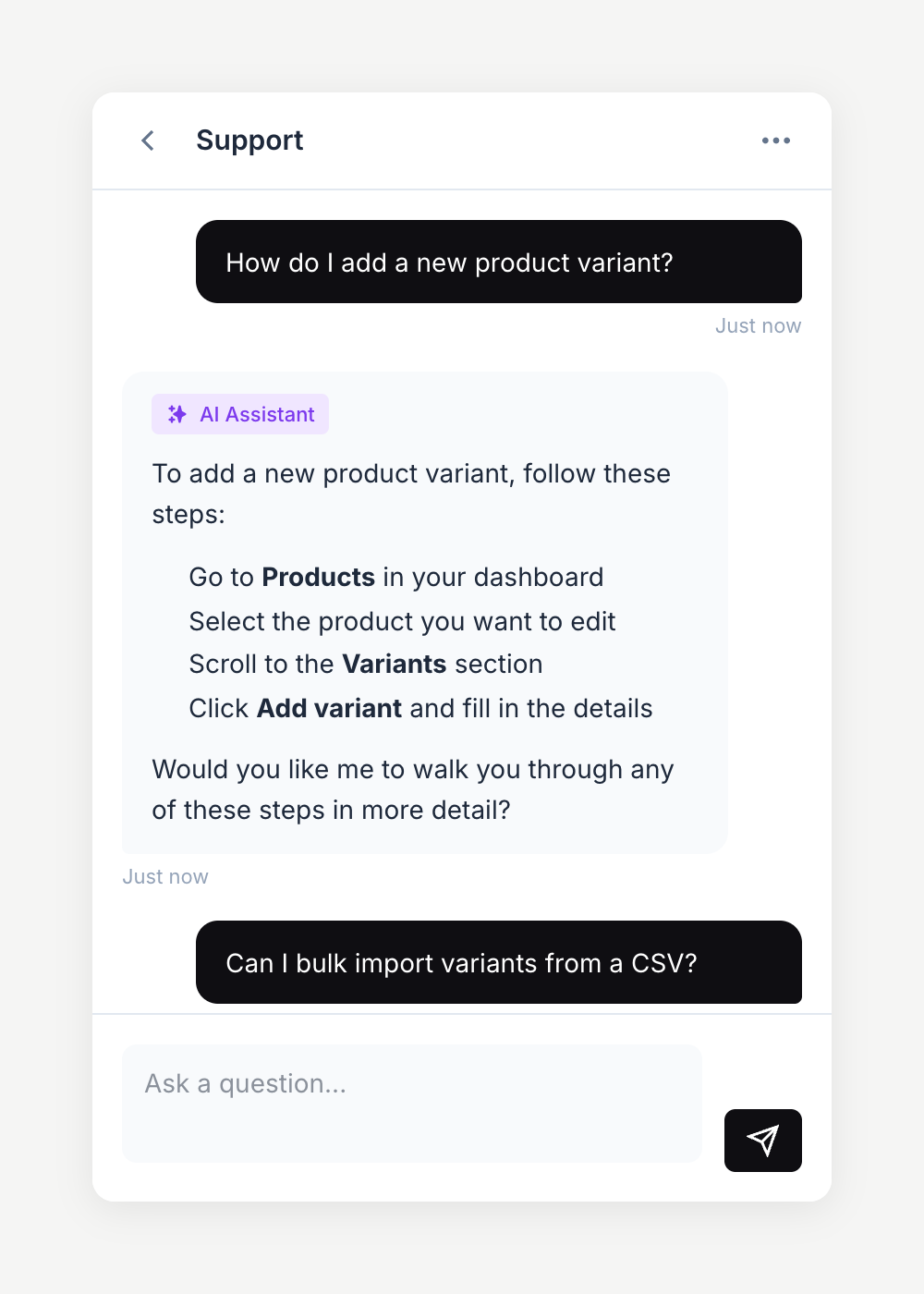
Chat widget responses are sent automatically—no human review step. Make sure your agent is well-configured and tested before enabling this.
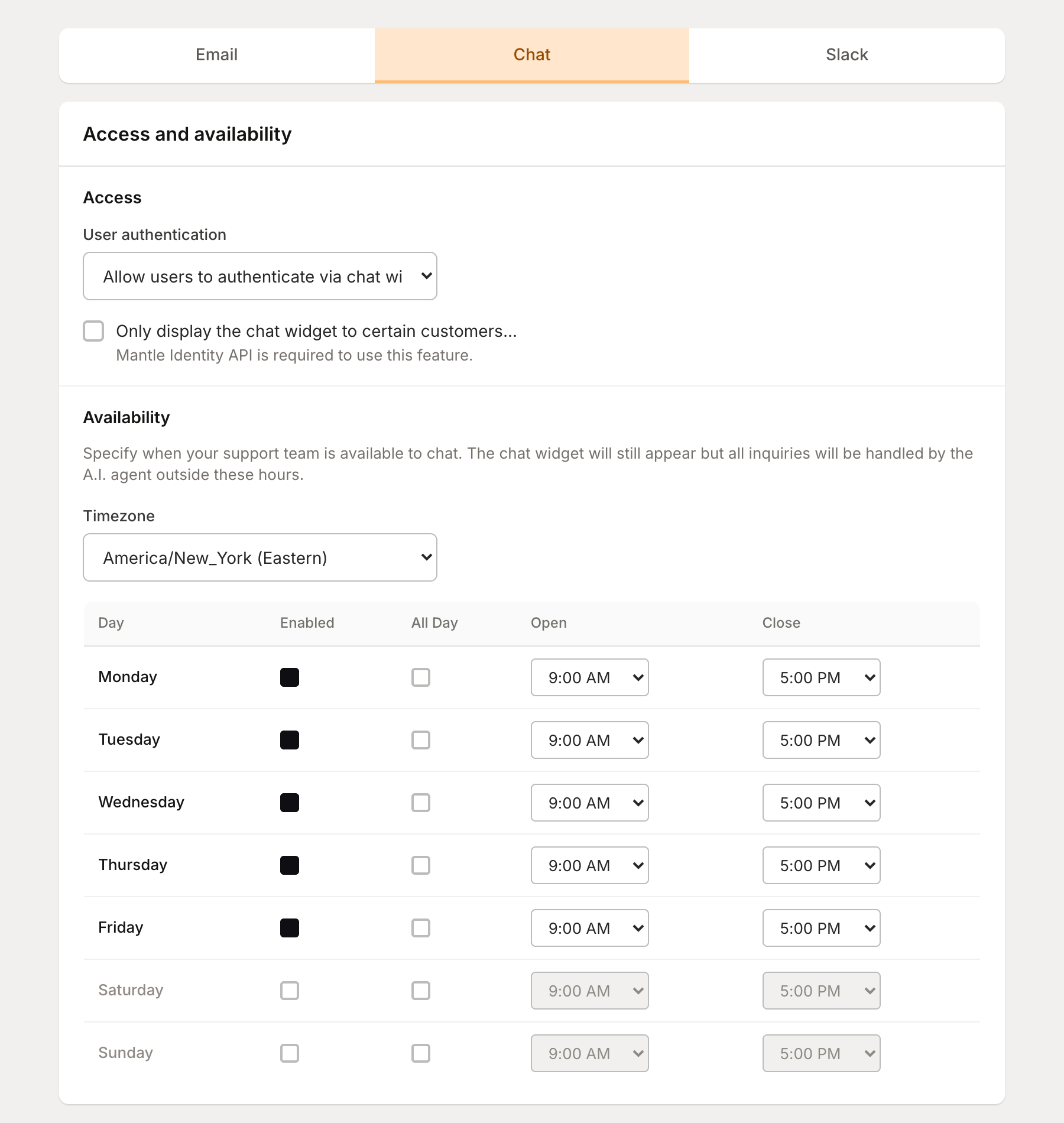
To enable AI-powered chat, go to your chat channel settings and configure the AI automation options. You can select which agent handles conversations and control when AI responds.
Training your support agent
The Support Sidekick works out of the box, but you'll get significantly better results by training it for your specific product and customers.
Customize the mandate
The mandate defines how your agent behaves. For support agents, focus on:
Tone and voice — Should it be casual or formal? Technical or approachable?
Product-specific context — What does your product do? What are the common gotchas?
Escalation criteria — When should it recommend escalating vs. trying to resolve?
Boundaries — What should it never do? (e.g., never promise refunds, never share internal pricing)
Add rules for edge cases
Rules are files that provide additional context. For support, good rules include:
Common troubleshooting steps for known issues
Pricing and plan details your agent should reference
Internal policies (refund policy, SLA commitments, etc.)
Product terminology and how to explain features to customers
Connect your documentation
If you're using Mantle's docs feature, the Support Sidekick can search your published documentation when drafting responses. This means answers stay consistent with what your customers can find on their own.
Connect your codebase
For technical products, connecting your codebase lets the agent investigate bugs and answer implementation questions with real accuracy. See the codebase section above for details.
For the full guide on configuring agents—including tools, rules, MCPs, visibility, and testing—see Configuring your agents.
Best practices
Start with the Support Sidekick. It's already tuned for support workflows. Customize it rather than building a support agent from scratch.
Write detailed mandates. The more specific your instructions, the better your agent performs. Include examples of good responses and explicit guidance on tone.
Use rules for consistency. If you have brand guidelines or specific formatting requirements, add them as rules so the agent follows them consistently.
Connect your codebase for technical products. If you're supporting a technical product, connecting your codebase dramatically improves the accuracy of bug investigations and how-to answers.
Test before enabling auto-responses. Use the agent debugger to simulate ticket analysis before turning on chat widget auto-responses. Response suggestions (which require human review) are safer to start with.
Review and iterate. Check the suggestions your agent creates and refine the mandate and rules based on what works.
Go further
Configuring your agents — Customize mandates, tools, rules, codebases, and more
AI agents — Overview of Mantle's agent system
Support channels — Set up email, chat, and other support channels
Flows — Create automated workflows that include AI agents
Getting started with help desk — Overview of Mantle's help desk features