

MCPs Overview
Mantle's MCP servers let you connect AI tools to all your customer data and functionality. Ask questions, automate tasks, and get insights—whether you're using our built-in AI Assistant or connecting your own tools like Cursor IDE or Claude Desktop.
What is MCP?
Model Context Protocol (MCP) is an open standard that lets AI tools securely access external data and APIs. Think of it as giving an AI assistant permission to read your Mantle database—so it can answer questions about customers, run analytics, and even take actions on your behalf.
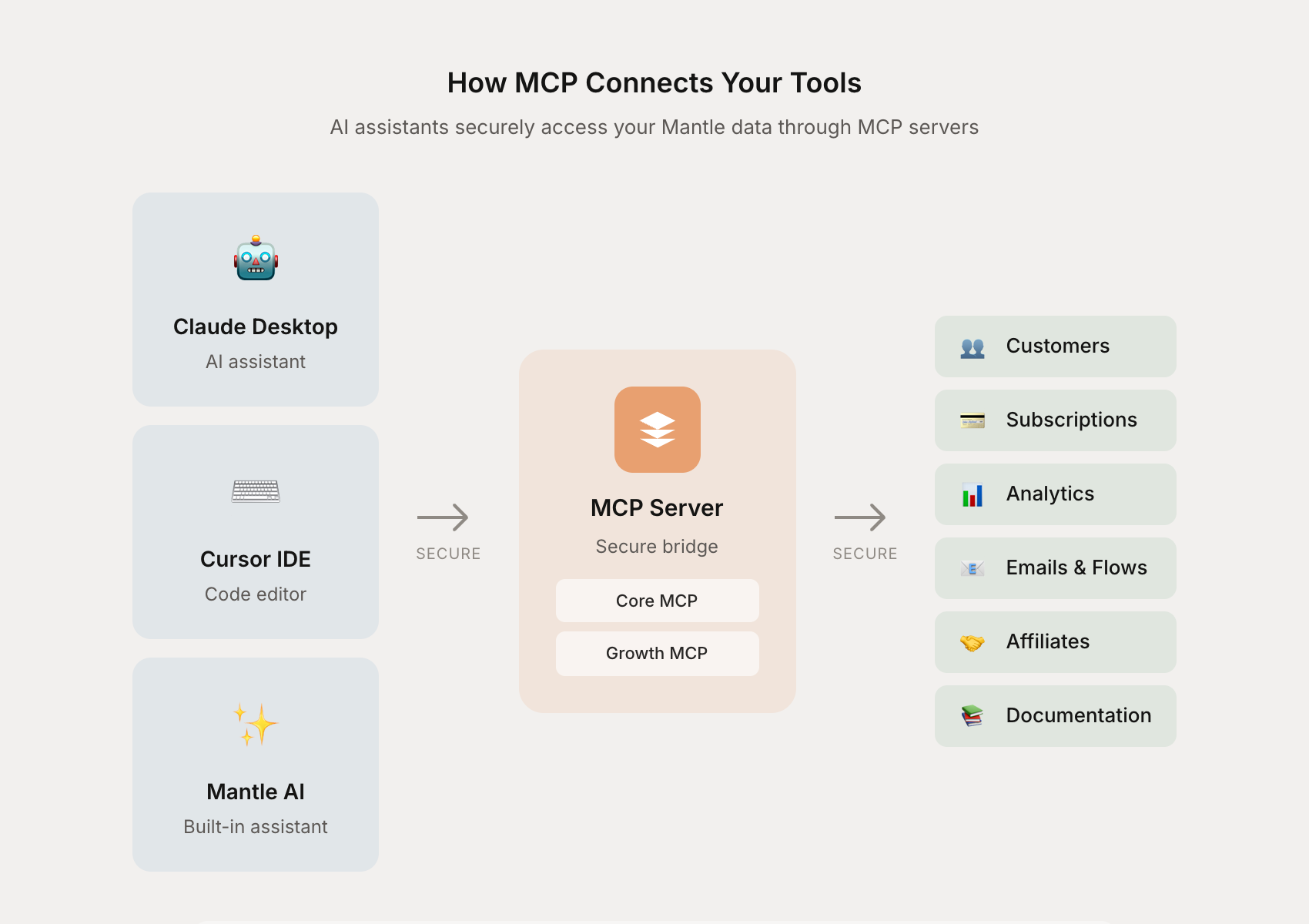
Your AI tools connect to Mantle through MCP servers, which act as a secure bridge to your data. Authentication uses your existing Mantle credentials—no separate API keys needed.
What you can do
With Mantle's MCPs, you can:
Get instant insights — "Show me my top 10 customers this month" or "What's my churn rate vs. last quarter?"
Manage your pipeline — Create deals, move stages, log activities, and track your sales pipeline
Automate workflows — Create and manage flows, send emails, and build automations through natural language
Handle support — Search tickets, add internal notes, and find saved replies
Build documentation — Create, update, organize, and publish help center articles
Expose docs to AI — Let any AI tool read your published documentation through your docs site's MCP endpoint
Manage affiliates — Track affiliate relationships, referrals, and payouts
Available MCPs
Mantle provides four MCP servers, each focused on different areas of your business:
| Core | Growth | Docs Management | Docs | |
|---|---|---|---|---|
| Focus | Customer data & analytics | Automation, support & partnerships | Help center management | Public documentation |
| Auth | OAuth | OAuth | OAuth | None |
| Access | Read & write | Read & write | Read & write | Read only |
| Endpoint | mcp.heymantle.com/core | mcp.heymantle.com/growth | mcp.heymantle.com/docs_management | your-docs.mantledocs.com/mcp |
Core MCP
Your main MCP for customer insights, business analytics, and sales pipeline management. Includes tools for:
Customers — Search, filter, and analyze your customer base. Get customer details, insights, and manage custom fields
Subscriptions & Plans — View subscription details, plan pricing, features, and billing cycles
Analytics — Run 50+ metrics on revenue, churn, activity, retention, and more
Sales CRM — Manage deal flows, create and update deals, move pipeline stages, and log activities
Tasks — Create, list, and update tasks associated with customers or deals
Transactions — View payment history, charges, refunds, and credits
App events — Track customer lifecycle events like installs, upgrades, and cancellations
Journal & Changelog — Create and manage journal entries and public changelog posts
Use it to answer questions like:
"Who are my highest-value customers?"
"What's the average time to first payment?"
"Show me customers who downgraded this month"
"Create a deal for Acme Corp in the Enterprise pipeline"
Growth MCP
Manage your support operations, automations, and partner programs. Includes tools for:
Helpdesk — Search tickets, view ticket details, add internal notes, and find saved replies
Flows — Create, update, and manage automation flows. Generate flow definitions with AI, preview changes before applying, and view execution history
Affiliates — Search affiliates, view program details, track referrals, and manage payouts
Use it for tasks like:
"Create a welcome email flow for new trials"
"Show me my top-performing affiliates"
"Find tickets about billing issues from this week"
"What's the commission breakdown for last month?"
Docs Management MCP
Full control over your documentation and knowledge base. This is the authenticated MCP for teams managing their help center content. Includes tools for:
Repositories — List and browse your docs repositories
Pages — Create, update, publish, unpublish, archive, and search documentation pages
Structure — Create and update collections and groups to organize your docs
FAQs — Create and update FAQ entries on documentation pages
Use it for tasks like:
"Draft a new help article about setting up webhooks"
"Update the billing FAQ page with info about our new pricing"
"Create a new 'API Reference' collection in our docs"
"Add FAQ entries to the getting started page"
Docs MCP
Every docs repository you create automatically gets its own MCP endpoint on its hosted docs domain. Unlike the other MCPs, the Docs MCP requires no authentication—it provides read-only access to your published documentation so any AI tool can use your docs as context.
The endpoint is available at https://your-handle.mantledocs.com/mcp (or https://docs.yourapp.com/mcp if you're using a custom domain).
Includes three read-only tools:
get_docs_tree — Browse the full structure of collections, groups, and pages
get_docs_page — Read the full content of any published page by ID or handle
search_docs_pages — Full-text search across all published pages
This is useful for developers integrating with your product (their AI tools can reference your API docs while coding), customer support bots that need accurate product information, or any workflow where AI needs your documentation as context.
To connect an AI tool, point it at your docs MCP endpoint:
{
  "mcpServers": {
    "my-app-docs": {
      "type": "http",
      "url": "https://your-handle.mantledocs.com/mcp"
    }
  }
}For more details on setting up your docs repository, see Documentation & knowledge base.
Connecting your tools
MCPs work with any AI tool that supports the Model Context Protocol standard:
Mantle AI Assistant — Built-in, no setup required (all plans)
Claude Desktop — Anthropic's desktop app (Advanced plan+)
Cursor IDE — AI-powered code editor (Advanced plan+)
Other MCP clients — Any tool supporting the MCP standard
To connect external tools to Core, Growth, or Docs Management MCPs, go to Settings → MCP to get your connection details and configuration instructions. For the Docs MCP, just use your docs site's URL with /mcp appended—no setup in Mantle needed.
Go further
Documentation & knowledge base — Set up docs repositories and the Docs MCP endpoint
AI agents — Create custom agents that use MCPs to access your data
AI-powered support — How AI improves your customer service
Flows — Automate workflows with AI and MCPs