

Building effective agents
Creating an agent is easy. Creating one that actually helps? That takes a bit more thought. This guide covers the practices that separate agents people love from ones that get ignored.
Start with a focused mandate
The biggest mistake is trying to build an agent that does everything. "Handle all customer questions" sounds efficient, but it creates an agent that's mediocre at everything instead of excellent at something.
Pick one job. An agent that's great at billing questions is more useful than one that's okay at billing, okay at technical support, and okay at sales.
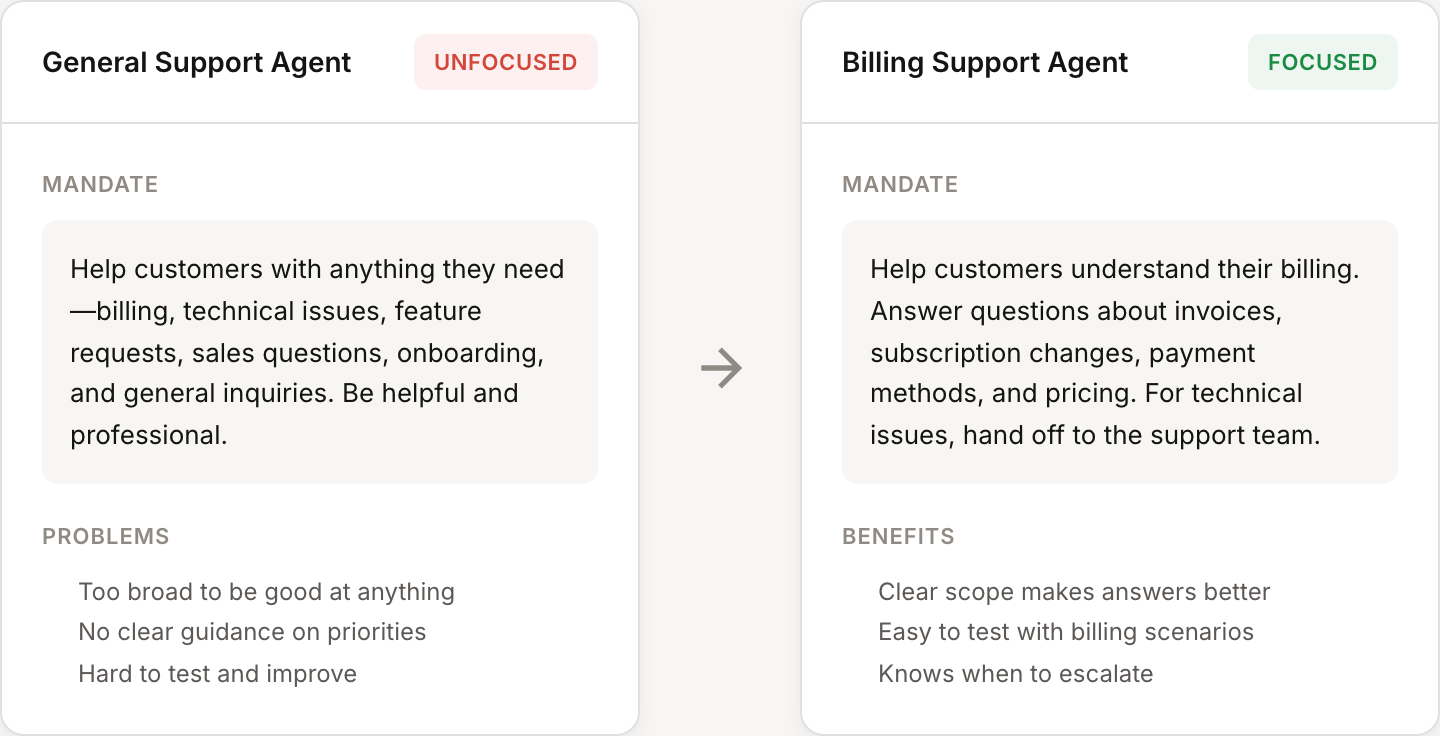
Unfocused mandate |
Focused mandate |
|---|---|
"Help customers with anything they need—billing, technical issues, feature requests, sales questions, onboarding, and general inquiries." |
"Help customers understand their billing. Answer questions about invoices, subscription changes, payment methods, and pricing. For technical issues, hand off to the support team." |
Once your billing agent is working well, create a separate agent for technical support. Specialized agents are easier to test, easier to improve, and give better answers.
Write instructions that work
Your mandate is a conversation with the AI. Vague instructions get vague results. You'll write these in the Mandate field on your agent's configuration page.
Be specific about behavior
Don't just describe what the agent does—describe how it should do it.
Vague |
Specific |
|---|---|
"Be helpful and professional." |
"Respond in 2-3 sentences when possible. Use the customer's name. If a request will take time, set expectations upfront." |
"Answer billing questions." |
"Look up the customer's current plan and billing history before answering. Explain charges in plain language, not billing codes." |
Include examples
Examples are worth a thousand words of instruction. Add them directly to your mandate to show the agent what good looks like:
When a customer asks about upgrading:
1. Check their current plan and usage
2. Identify which higher plan fits their needs
3. Explain the price difference and what they'd gain
4. Offer to make the change or send them a link

Example response: "You're currently on the Starter plan at $29/month. Based on your usage, the Pro plan at $79/month would give you unlimited API calls and priority support. Want me to upgrade you now, or would you like to review the full comparison first?"
Define the edges
Tell the agent what to do when it doesn't know something. Include these guidelines in your mandate:
"If you're not sure about a policy, say so and offer to connect them with a human."
"Never guess at pricing—always look it up or ask."
"For legal or compliance questions, escalate immediately."
Agents that admit uncertainty are more trustworthy than ones that confidently give wrong answers.
Add context deliberately
Rules, codebases, and MCPs give your agent more to work with. But more isn't always better.
When to add rules
Rules provide additional context beyond the mandate. Click Add rule in the Rules section of your agent's configuration to create them.
Rules are great for:
Company-specific information — Pricing tiers, refund policies, feature lists
Style guides — How to talk about your product, terms to avoid
Process documentation — Steps for common procedures
Skip rules for things the agent already knows (general knowledge) or can look up with tools (customer data, subscription status).
When to add codebases
Connect codebases in the Codebases section by clicking Add codebase. You can connect via GitHub, GitLab, or upload a ZIP file.
Codebases help when your agent needs to understand your product deeply—answering technical questions, helping with integrations, or providing context to developers during escalations.
They're less useful for customer-facing agents handling billing or general questions. Don't add a codebase just because you can.
Choose tools carefully
Tools let your agent take actions: look up customers, create discounts, send emails. Click Manage tools in the Tools section to select which capabilities your agent has.
It's tempting to enable everything, but restraint pays off.
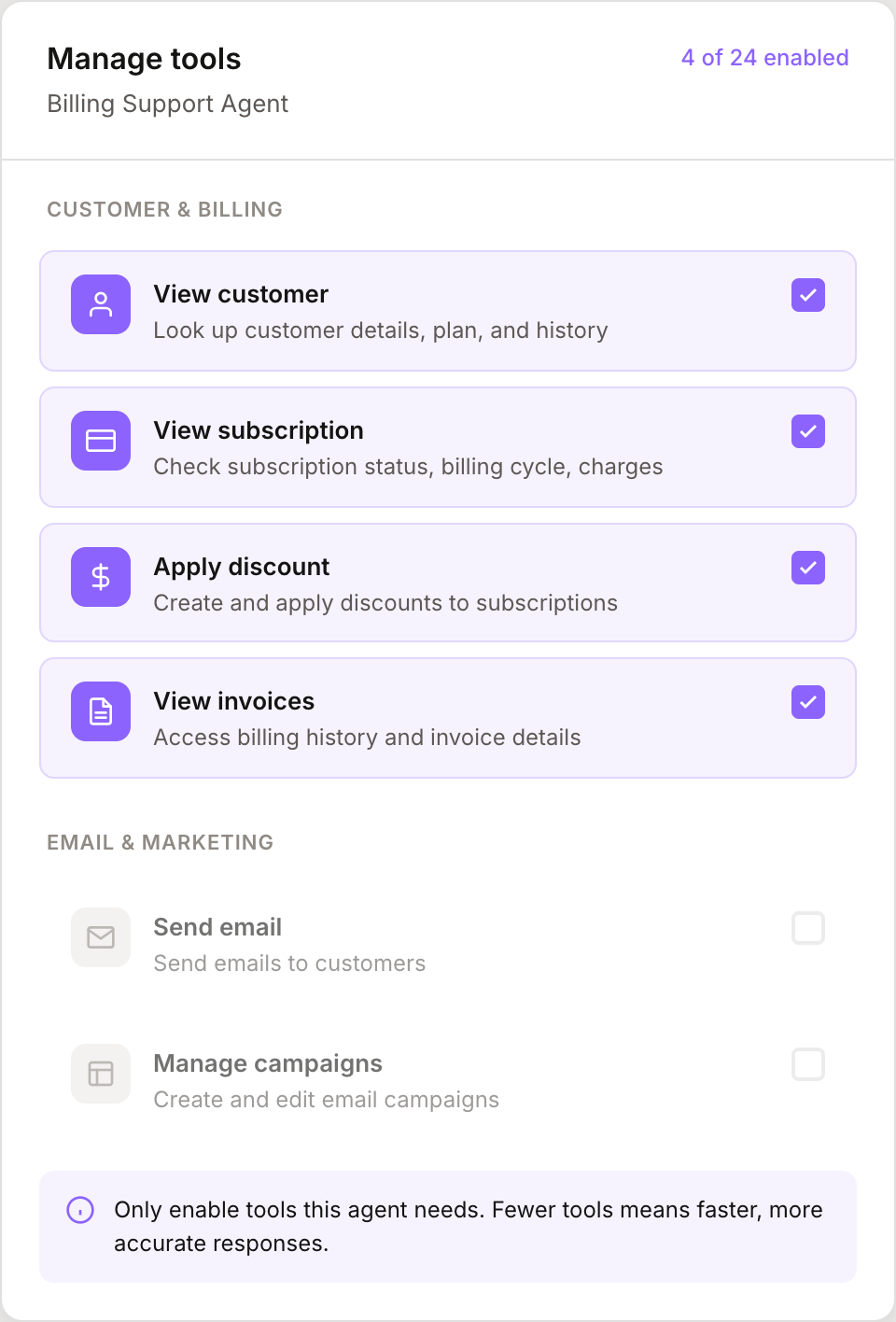
Match tools to the job
A billing agent needs tools for viewing subscriptions, applying discounts, and checking payment history. It probably doesn't need tools for managing email campaigns or editing documentation.
Extra tools create confusion. When an agent has 50 tools available, it's harder to pick the right one. When it has 8 tools that all relate to its job, decisions are obvious.
Start small, add as needed
Begin with the minimum tools required. Use the agent. Notice when it can't do something useful. Add that tool. This approach builds agents that have exactly what they need—nothing more, nothing less.
Connect external systems with MCPs
If your agent needs data from outside Mantle, click Add MCP in the MCPs section to connect external Model Context Protocols. These let your agent access your own APIs, third-party tools, or internal systems.
Only add MCPs when the agent genuinely needs external data. Each connection adds complexity and potential points of failure.
Test like a real user
The best way to improve an agent is to use it. Not quick tests—real conversations.
Try to break it
Ask questions outside its expertise. Give it incomplete information. Be vague. See what happens when you ask the same thing three different ways.
Good test questions:
"Can you help me?" (vague—does it ask clarifying questions?)
"I want to cancel" (emotional—does it stay helpful?)
"What's your refund policy for enterprise contracts signed before 2024?" (specific—does it know its limits?)
Questions in different languages, with typos, or with unusual phrasing
Iterate based on failures
When the agent gives a bad answer, figure out why and fix it in the right place:
Missing information? Add a rule with the details it needs.
Wrong tool choice? Clarify in the mandate when to use what.
Bad tone? Add examples of good responses to the mandate.
Outside its scope? Add explicit boundaries to the mandate.
Can't answer technical questions? Connect your codebase.
Small, targeted improvements compound. An agent that's 1% better each week is dramatically better in a few months.
Common mistakes to avoid
Mistake |
Why it hurts |
|---|---|
The "do everything" agent |
Jack of all trades, master of none. Users don't trust it for anything important. |
Tool overload |
Too many options slow down responses and increase mistakes. The agent spends time figuring out which tool to use instead of helping. |
Vague instructions |
"Be helpful" means nothing. The agent interprets it however it wants, which may not match what you wanted. |
No edge case handling |
The agent makes up answers when it should say "I don't know" or escalate. |
Set and forget |
Agents need ongoing refinement. Review conversations, spot patterns, improve the mandate. |
Quick checklist
Before launching an agent, run through this list:
☐ Does it have one clear job? (defined in the mandate)
☐ Does the mandate include specific behaviors, not just goals?
☐ Are there examples of good responses in the mandate?
☐ Does it know what to do when it doesn't know something?
☐ Are the tools limited to what it actually needs?
☐ Have you added rules for company-specific information?
☐ Have you tested it with real questions, including tricky ones?
An agent that passes these checks is ready for real use. One that doesn't will frustrate your team and your customers.